




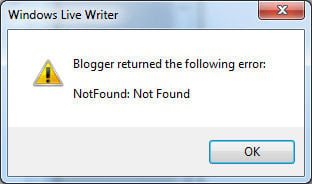
Blogger Windows Live Writer – Blogger returned the following error: NotFound: Not Found – Workaround
 Story by:
MyBeer Buzz
Story by:
MyBeer Buzz

I know this isn’t beer related, but for those of us who use Google’s blogger as a host and Windows Live Writer as a tool, it has become enough of an “inconvenience” to start this post.
When posting to your blogger-based blog or when trying to open up an existing post using Windows Live Writer, the above error (Blogger returned the following error: NotFound: Not Found) is displayed and a login box follows. This same error returns when you login even with proper username/password.
Apparently on May 26th long about 11PM EST, google implemented a code change that changes the way they authenticate from the old version (OpenID 2.0) to the new one called OAuth 2.0. They announced this news here, with a deadline of April 20th 2015 to shutdown the OpenID 2.0 authentication. This shutdown ultimately occurred on May 26th 2015.
I don’t use the other tools, but based on what I am gathering, there are currently NO standalone blogging tools that work with blogger. As of 29 May 2015, Zoundry Raven and BlogJet (among others) are not working either.
The TEMPORARY (pain in the neck) workaround:
- Write your blog post in Windows Live Writer (WLW) as your normally would.
- Click on the Source tab in WLW
- Copy all of the html code into the clipboard.,
- Create a new post in the web version of Blogger.
- Click on the HTML tab.
- Paste in the copied html code.
**Images must be saved and manually loaded into your post via the blogger website (they cannot be pasted in or copied as part of your copied html code).
So far this appears to be a problem falling into the gap between google (who implemented this change knowing it would likely undercut several of the major blogging tools like WLW) and Microsoft (who have effectively turned what I consider the best blogging tool available, into an orphan).
There has been rumor of an Open Source WLW coming and rumor of Google implementing this change to kill the other blogging tools so they can release one of their own, but so far neither seems likely.
There have also been quite a few people who have chosen to create a WordPress blog and import their posts from blogger into WordPress, but keep in mind that if you’ve written or heavily customized your template in blogger, the likelihood that a) you will find something similar in WordPress is slim and b) the likeihood that your html plug-ins will continue to function is also slim. In other words, if you’re willing to start all over and re-write your template or simply adopt a new one, then the migration to WordPress is probably feasible. Otherwise, plan to spend a lot of time doing it.
In the mean time, you can follow along with the major threads on the Google forum post and the Microsoft forum post…..Microsoft Answers posts is here.
Be sure to bookmark this post as I will update it periodically:
28 May 2015: This from Nick at Google support:
Someone from Microsoft (Scott Hanselman @shanselman on Twittter) tweeted me and stated that Google and Microsoft are working together on a fix. He says “I just talked to google lead on blogger. They deprecated a login api and WLW hasn’t been updated. There’s two things to fix. First, they’ll work on it on their side, and second, we’ll try to update WLW to the new login style. Their fix will be first. They’ve been very kind, and we’re actively working through it.”I’m skeptical, as we have seen google’s response thus far, but I hope this is a positive sign.
UPDATE 10 Dec 2015:
After working well for over 6 months, the dreaded “Blogger returned the following error: NotFound: Not Found” has returned. Depending on how long your machine was up with Windows Live Write running, you may not have noticed it until later. My home machine stopped working 7PM on 12/10 and my work machine worked until about 11AM on 12/11. In any case it looks like we’re dead in the water again.
There is some semi-good news in that the Open Source version of Live Writer aka Open Live Write did manage to debut on 12/9. No word on whether this was the reason for Google to pull the plug on the old authentication scheme on or about that same day but no matter. You can find Open Live Writer here, HOWEVER (and it’s a pretty big however) this verion of Open Live Writer doesn‘t support the oAuth authentication that is causing all of the problems…so on the day Windows Live Write stopped working, so did Open Live Writer. If you‘re trying to download and install Open Live Writer, you’ll only get up to the screen where it asks for your blogger username/password, and that login will fail. So for now once again we’re stuck with the above “workaround.” It takes me roughly twice as much time to post using the workaround as it does using Windows Live Writer, and I’ll admit I also find the formatting of posts using the blogger web site to be at best “finicky.” I’ll keep updating this thread and if you want to see more:
Open Live Writer is here
A thread on the Open Live Writer support forum relative to blogger is here
Some comments (scroll down) about this issue for OLW is here
Some updates from blogger forums here. So far it looks like they aren’t willing to wait to get Open Live Writer working before they shut off the WLW/blogger connection….and I quote blogger support:
“
Hello bloggers,
UPDATE 16 Dec 2015:
Hey everyone,


Comments 0
No Readers' Pick yet.